Waiver Campaigns for Members
When you update your waiver, or start requiring one for a plan, a waiver campaign asks members to sign. It emails them, reminds them, and shows staff who still needs to sign at check-in.
Changing a waiver form never forces anyone to sign again by itself. Re-signing only happens when you start a campaign.
Start a campaign
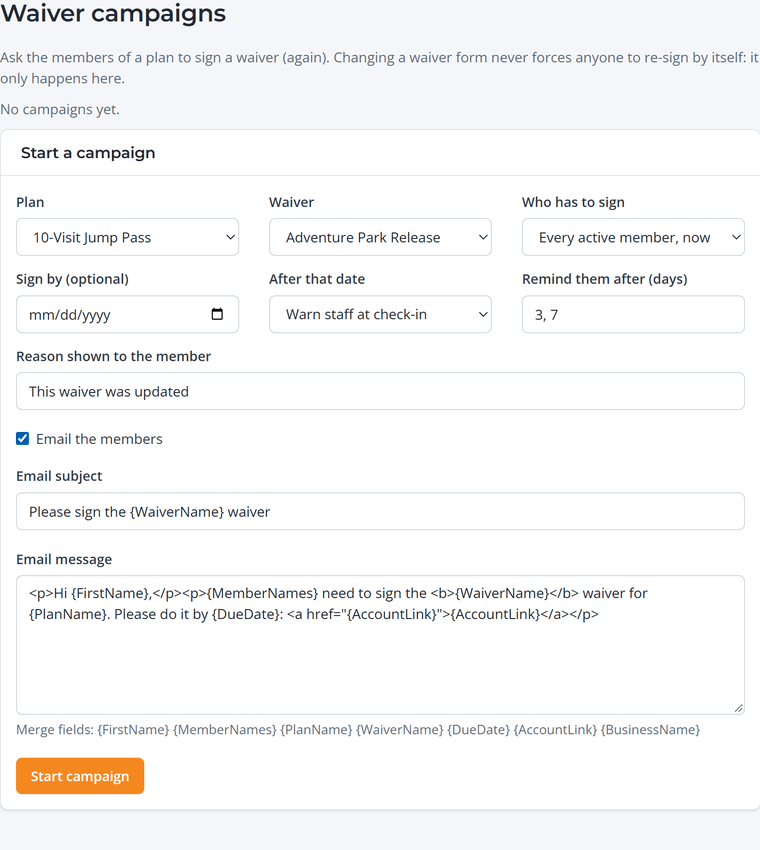
- Go to Memberships › Waiver campaigns.
- Choose the plan and the waiver.
- Choose who has to sign: every active member now, each member at their next renewal, or new members only.
- Set a sign-by date (optional) and what happens after it: warn staff at check-in, or block check-in until they sign.
- Write the reason members will see (for example "Our waiver was updated") and check the email wording. Reminders go out after the number of days you choose.
- Click Start campaign.
Follow up
Each campaign shows how many members have signed. On Memberships › Members, choose Waiver needed to see who hasn't. Members can sign from the link in the email or from their account, and staff see a reminder when those members check in.