Seasonal Pricing
Seasons let the same activity have different prices and hours at different times of year, like summer rates or longer hours over school holidays. If your prices and hours are the same all year, you can skip this page.
How seasons work
A season is a date range that repeats every year, for example June 1 to August 31. New accounts start with one season, All Year. When you add more seasons:
- Each activity's Pricing tab gets a section per season, so you can set summer prices separately from the rest of the year.
- Each activity's Availability tab lets you pick a different schedule per season, for example longer summer hours.
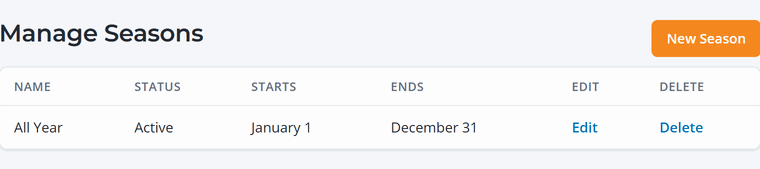
Add a season
- Go to Activities › Seasons and click New Season.
- Name it (for example "Summer") and pick the Start Date and End Date. Dates are month and day, and the season repeats every year.
- Save, then open each activity and fill in its prices and schedule for the new season.
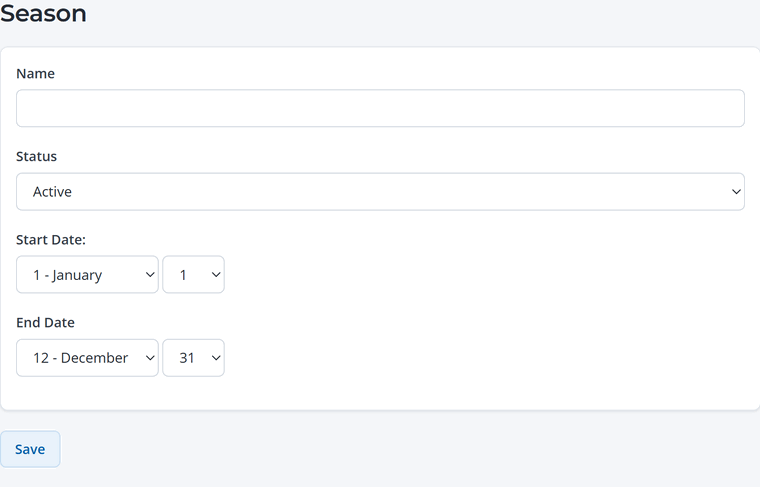
Fill in prices for every season. If an activity has no price for a season, guests can't book it on those dates. After adding a season, check the Pricing tab of each activity.
Seasons, time rules or blackout dates?
- Seasons are for long stretches with different prices or hours (summer, winter).
- Time rules are for patterns within a week or day (weekends, evenings). See Guest Types and Time-Based Pricing.
- Blackout dates are for days you're closed or fully booked (holidays, private events). See Blackout Dates.