This is the biggest update in WaiverFile's history. For years WaiverFile has made sure every guest signs before they play. Now it handles the whole visit: guests book online, sign their waiver ahead of time, pay, and check in fast, whether they booked weeks ahead or walked in the door five minutes ago.
A lot of what's below came straight from your suggestions. Here's everything that's new.
Online booking, with waivers built in
Guests can reserve their spot and pay online, and sign their waiver as part of the same booking. There's no monthly fee: a small booking fee is added at checkout, paid by your guests, and payments go straight to your own Stripe account. See Pricing for the details.
- Activities and time slots. Set your schedules, capacity, guest types and prices, add-ons and blackout dates.
- Parties and group packages, with deposits. Invoices show guests what's paid and what's still due.
- Events and classes. Sell concerts, races, tournaments and multi-week classes with several ticket types, limits and sale dates. Set a class schedule once and every session is created for you; skip a holiday or move one class without starting over.
- Events pages and calendars on your booking site, and guests can add events to their own calendar.
- Cancel an event and refund everyone from one screen, with a message to every guest.
- Memberships. Monthly or yearly plans, season passes and visit packs, for one person or a household, with automatic renewals, member perks and a member card. Members can manage their plan from their account, and you can email your members from WaiverFile.
- Receipts, invoices, itineraries and printable tickets for every booking.
- Policies written for you. Standard booking terms, privacy, cancellation and membership policies are built from your settings, and guests agree to them at checkout. You can customize them or link to your own.
- Easy return visits for guests. Guests without a password get back into their booking with an emailed link or a 6-digit code.
- A sample booking shows you exactly what a booking looks like in your admin, without making a real one.
More about online booking · Events and classes · Memberships
Point of sale for the front desk
Walk-ins get the same smooth experience as online bookings. Sell at the counter and every guest still ends up with a signed waiver.
- A fast sale screen for activities, event tickets, add-ons and memberships, with live spots left, a popular-items row and "book again" for returning guests.
- Every way to pay: cash with change due, checks, card readers and split payments.
- Card readers that run straight from WaiverFile: tap, chip or swipe, with no extra app. Readers are ordered through our support team.
- Cash drawers and receipt printers, with opening floats, paid in and out, counts and a close report.
- Change bookings at the desk: add guests or add-ons, move guests to a new time, apply a discount, refund or cancel.
- Front desk reports by payment type, staff member and drawer.
More about point of sale
Check-in with QR codes
- QR tickets and member cards on the confirmation page, in email and in each guest's "My Tickets" page. You choose whether to turn them on.
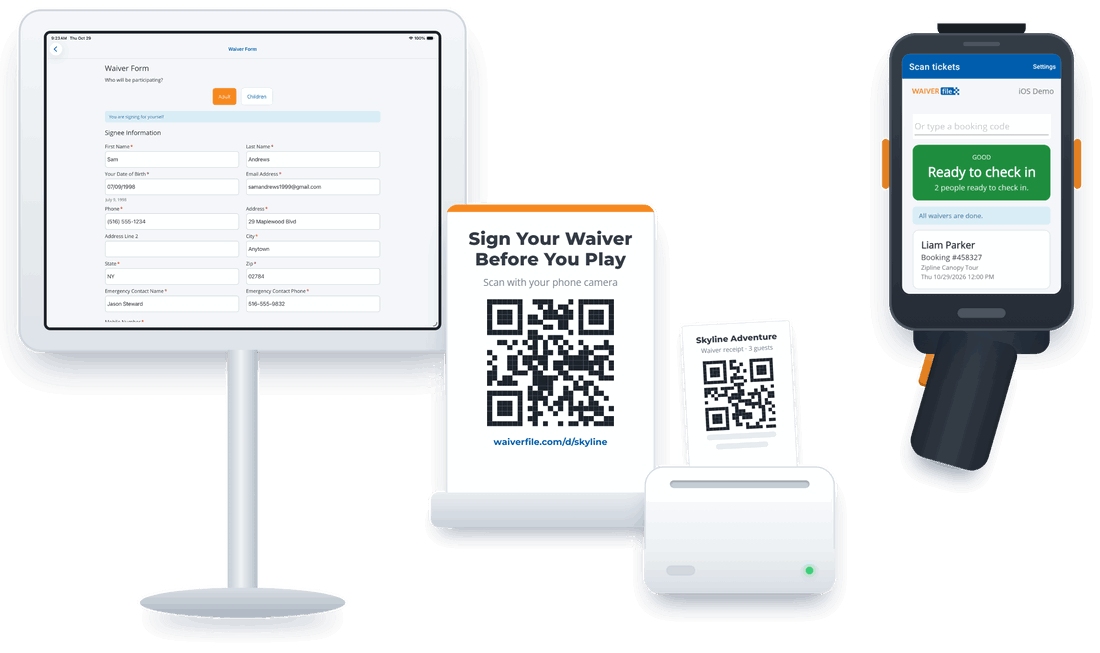
- Self check-in. Guests scan their own ticket at a kiosk, sign any missing waivers right there, and head in. Anything that needs a person sends them to the front desk.
- A live arrivals list for staff, and a check-ins page for the day with undo for mistakes.
- A check-in setup guide that asks how your guests arrive and recommends a setup.
More about check-in
The WaiverFile Venue app
Our new app for iPad and Android tablets and phones replaces the old WaiverFile and WaiverScan apps. One app does it all:
- Waiver kiosk that keeps working when your internet doesn't.
- Self check-in station and ticket scanner for staff.
- Front desk mode: sell, take payments, check guests in and print receipts and tickets.
- Send waivers to a signing station. Scan a ticket, see who still needs to sign, and send their waivers to a tablet or show a QR code for the guest's phone.
- Simple setup: scan a QR code from your dashboard, and a kiosk unlock code keeps your settings safe.
Get the WaiverFile Venue app
A website built for you
Answer a few questions about your business and we'll build you a professional booking website, with pages, photos and colors to match your logo. Use it as your main website, or connect it to the one you already have.
- Ask for changes in plain words, like "add an events page", and review them before they go live.
- Put booking on your current website: embed your activities, events, calendar or membership plans, or add a booking button, link or QR code.
- Photo galleries and social links, plus Google Analytics, Google Tag Manager and Meta Pixel support with a cookie banner and cookie policy included.
- Spanish and French versions of your booking website.
More about your booking website
Waivers
- A new look for your waiver pages: cleaner, with big, easy buttons in your brand color, the same look as the Venue app. If you prefer the old look, you can switch back on your Colors page.
- Import your waiver. Upload your current waiver as a Word file, PDF or photo and we'll set up the form for you to review.
- A new question builder with more question types: dates, email, phone, yes / no, a single checkbox and section headers.
- Photos and attachments in one place, such as a driver's license from the app's camera or a web upload.
- Language versions of a waiver. Link a Spanish copy to your English waiver, and guests who choose Spanish get the Spanish agreement.
- A new workflow editor for multi-step sign-ups and tournaments, with drag and drop and a live preview.
More about waiver forms
A new admin area
- A fresh, modern look throughout the admin.
- Dashboards you can customize, with front desk and manager layouts: arrivals, guests who need attention, capacity, check-ins and revenue at a glance.
- One search for bookings and waivers.
- New reports: revenue, sales tax, payments, refunds, balances, events, memberships, check-ins and waivers, with Excel and CSV export.
- One Devices page for tablets, card readers, printers and cash drawers.
- A new Help page where you can find answers, open and track support requests, and get a Support PIN so we can verify you quickly when you call.
Integrations
Webhooks and Zapier connections are more reliable, with automatic retries and a delivery log, and API keys can now be sent more securely. More about integrations
Two-step verification
You can now protect your admin sign-in with two-step verification, using an authenticator app, a text message or an email code. Set it up any time from your account menu at the top right: Two-step verification.
It will become required for everyone in the coming weeks, and we'll let you know before that happens. Don't want to wait? Account owners can require it for everyone on their account now under Business › Admin Access (classic menu: Settings › Manage Admin Access), or contact us and we'll help you turn it on for your team.
Getting started
Everything above is in your account now: just log in. If you're a waiver customer and want to start taking bookings, our booking setup guide walks you through it, or book a demo and we'll set it up with you.
Thank you for being with us. Many of you have been with WaiverFile for years, and we're grateful for your support and your ideas. Keep them coming.
Published November 10, 2026